Step 2.1: Select Receiver
Referrals may be sent via the eReferral system using one of three methods.
- Standard eReferral: Electronic referral to member agencies fully registered with the S2S system.
- Fax referral: Using the FAX gateway.
- Email referral: Secure email using the PKI email facility.
eReferrals
To use the eReferral sending method, the receiving agency must be registered with the S2S system.
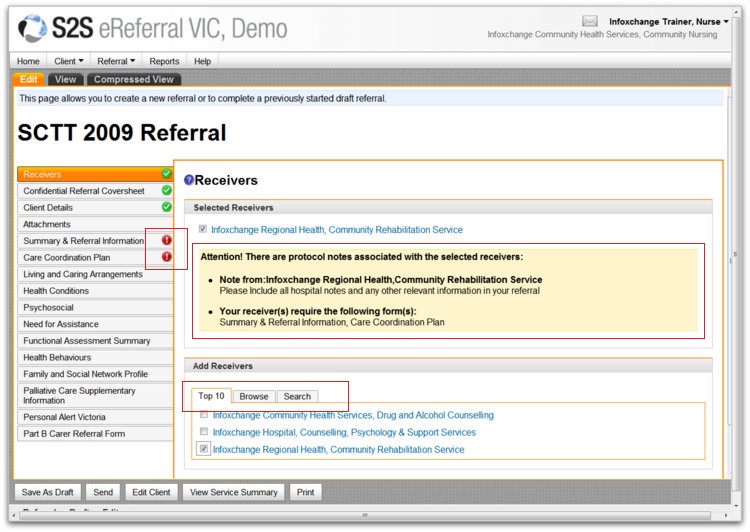
To select a registered agency, look under the Add Receivers heading at the first 2 tabs; Top 10, and Browse.
Top 10
Lists the 10 providers that your service has sent the most referrals to. If the correct agency/service is in this list, simply put a tick in the tick-box.
Browse
Click the Browse tab to list regions, and the S2S member agencies will appear. Tick the box next to the service you wish to refer to and it will appear in the selected receivers area above.
NB: A Receiver can specifiy protocols for 'required' information. Once a receiver is ticked, if they do have any protocols/minimum information requirements, red exclamation marks will sign-post required SCTT forms.
Fax and Email Receivers
Fax Referrals
- The fax gateway allows referrals to be sent via fax straight from the system to a direct, secure, fax number (i.e. you do not need to use a fax machine).
- Attachments cannot be sent using the Fax referral method. Any attachments will need to be faxed separately.
Email Referrals
- The PKI facility allows referrals to be emailed to services with a secure PKI facility installed. You can also use this to send referrals to the GP network and to RDNS. See RDNS and HL7 Referrals.
- Attachments can be sent using the PKI email facility.
If the agency you need to send to is NOT registered in the S2S system, you will have to go to the Search tab and use either the Fax or Email Referral method.
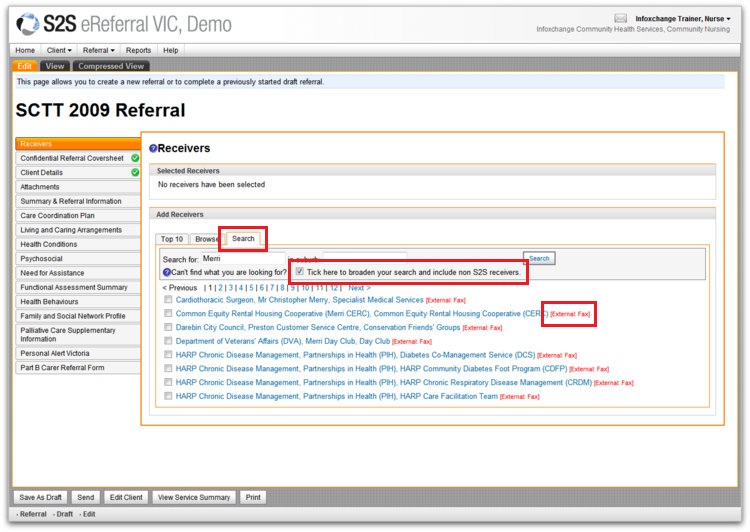
From the Search tab
- Enter the name of the agency you wish to search for.
- Enter the suburb (optional).
- Put a tick in the checkbox to ‘include non S2S receivers’.
- Click Search.
- A list of receivers will appear. If the receiver appears, select it, OR run another Search.
NB: Once you have found the agency/service – the eReferral system will show which method of sending is available for that particular agency. It will either show ‘External: Fax’ or ‘External: PKI’ in red next to the listing.
RDNS Receivers
To send a referral to RDNS:
- Click on the Search button from the Select Receivers area and enter Royal District Nursing Service or RDNS
- Tick the check box that says ‘Tick here to broaden your search and include non S2S receivers’.
- Click Search. Services are listed with the [External: PKI-email] at the end - ensure you select [External: PKI-email] NOT [External: Fax]
- Tick the check box next to the name.
HL7 Receivers (GPs)
To send a referral to a GP:
- Click on the Search button from the Select Receivers area and enter the name of the receiving GP. For example, Dr Heenetigala.
- Tick the check box that says ‘Tick here to broaden your search and include non S2S receivers’.
- Click Search. GPs are listed with the [External: HL7-email] at the end.
- Tick the check box next to the name.
Please note that you cannot attach documents to referrals sent to GPs.
